
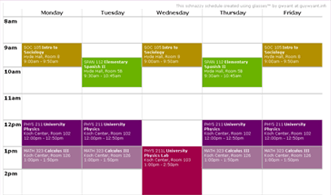

step un taking you about twenty seconds
Making sure you are using Firefox, copy the text of your schedule from Webadvisor. Here's how >
step deux probably around one second
Paste it into The Box below.
step trois hopefully less than one second
Click The Button and voila! Your very own printable, bookmarkable, shareable week.
Problems? See known issues section below.
want to know more?
This website creates a week-long calendar of your classes for any semester. It is specifically tailored to work with a certain format of data, which Firefox produces when you copy and paste an exact area of the Webadvisor page. The algorithms used are very, very picky. Thus, any tiny change in the format put into the box will be shown in the final project - perhaps making it unreadable - so if your week doesn't look right, try the select > copy > paste sequence again, or check for strangeness in your schedule.
-- Guy
known issues
- If a single class meets more than one time per week, a class might be missing from your schedule.
- Browsers other than Firefox produce different copy+pasted output, sometimes causing a blank schedule. Download Firefox, or visit this website on someone's computer who has Firefox and email yourself the link to the schedule page.